

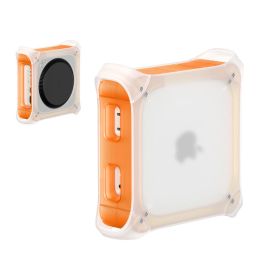
A Mac mini stand is a raised base that lifts your Mac mini off the desk for better airflow, and a Mac mini docking station or hub adds extra USB-A, USB-C, SD card and SSD connections next to it. Whether you search for a Mac mini dock, a Mac mini hub with SSD slot or a Mac mini M4 stand, you will find aluminium stands and hubs from Casecentive and retro-style docks and cases from Wokyis here, all listed for the Mac mini M4, M4 Pro, M5 Pro and M6. Looking for more for your desk? Browse all our Mac accessories.
What are the benefits of a Mac mini stand or dock?
Better airflow and a tidy desk
A stand lifts the Mac mini off the desk and leaves room for cable management. The Casecentive Aluminium Stand is made of aluminium and measures 13.85 x 12.7 x 3.6 cm.
More ports where you need them
A Mac mini hub adds USB-A 2.0, USB-A 3.2 and USB-C connections plus SD and Micro SD card readers. The Casecentive 8-in-1 Aluminium HDMI Dockingstation Hub & Stand also has an HDMI port.
Extra storage with an SSD slot
Both Casecentive hubs have an SSD slot, and the Wokyis Retro dock holds an M.2 NVMe SSD of up to 8TB. SSDs are sold separately.
A retro look for your Mac mini
The Wokyis Retro range gives your Mac mini the look of a classic Macintosh, as a case or as a dock with a 5-inch display, for example the Wokyis Retro Case Bondi Blue.
Which Mac mini stand or docking station should you choose?
Do I need a Mac mini stand or a docking station?
Choose a stand if you mainly want your Mac mini raised, cooler and out of the way. The Casecentive Aluminium Stand does exactly that and nothing more. Choose a docking station or hub if you also want extra connections. The Casecentive 7-in-1 Aluminium Dockingstation Hub & Stand and the Casecentive 8-in-1 Aluminium HDMI Dockingstation Hub & Stand combine a stand with USB-A, USB-C, SD and Micro SD ports and an SSD slot, and the 8-in-1 adds HDMI. If you also want a display and a faster SSD enclosure, look at the Wokyis Retro docking station. For a closer look at the Mac mini itself, read our Mac mini M4 (Pro) guide.
Which dock or stand fits my Mac mini M4, M4 Pro, M5 Pro or M6?
All Casecentive stands and hubs are listed for the Mac mini M4, M4 Pro, M5 Pro and M6, and so are the Wokyis Retro docking stations. The Wokyis Retro Cases are made for the Mac mini M4 and M4 Pro (2024) only, so check the model before you order. Not sure which Mac mini you have or which generation suits you? Our Mac mini 2024 review explains the differences. The Wokyis Retro docks also work with other Thunderbolt 5, Thunderbolt 4, Thunderbolt 3 or USB4 computers, such as a MacBook or Mac Studio.
Casecentive hub or Wokyis Retro dock: what is the difference?
The Casecentive hubs are slim aluminium stands that sit under your Mac mini and add USB-A, USB-C, SD, Micro SD and an SSD slot. The Wokyis Retro dock is a separate Macintosh-style unit with four USB-A ports, one USB-C port at 10Gbps, SD and Micro SD UHS-II card readers, an M.2 NVMe SSD enclosure for SSDs of up to 8TB and a 5-inch display with flip clock. Pick a Casecentive hub for a compact, matching setup, or a Wokyis Retro dock if you want fast storage, a display and the retro look.
Wokyis Retro 10Gbps or 80Gbps: which one do I need?
The two docks look the same and have the same 5-inch display and ports. The difference is the SSD speed: the 10Gbps version suits backups, photos and everyday storage, while the 80Gbps version comes with a Thunderbolt 5 cable and is made for 4K and 8K editing and large project files. For the full 80Gbps you need a Mac mini M4 Pro, because a standard M4 is limited to 40Gbps. Read the full Wokyis Retro M5 10Gbps vs 80Gbps comparison for the details.
Compare our popular Mac mini stands and docks
| Feature | Casecentive 8-in-1 Hub | Casecentive Aluminium Stand | Casecentive 7-in-1 Hub | Wokyis Retro Dock 10Gbps |
|---|---|---|---|---|
| Type | Hub and stand | Stand | Hub and stand | Retro docking station |
| Material | Aluminium | Aluminium | Aluminium | Plastic with aluminium SSD cover |
| USB ports | USB-A 2.0, USB-A 3.2, USB-C | No | USB-A 2.0, USB-A 3.2, USB-C | 4x USB-A, 1x USB-C (10Gbps) |
| Card readers | SD and Micro SD | No | SD and Micro SD | SD and Micro SD (UHS-II) |
| SSD slot | Yes | No | Yes | Yes, M.2 NVMe up to 8TB (10Gbps) |
| HDMI | Yes | No | No | HDMI input for the display only |
| Display | No | No | No | Yes, 5-inch IPS |
| Best for | A complete desk setup with HDMI | A raised, cooler Mac mini | A compact hub with card readers and SSD | Fast storage, display and retro look |
Is your model not listed? Check the full range above or browse all Mac accessories.